The problem: a post that looked broken
A native-plant group I work with has an automation that turns emailed garden updates into posts on their website. Someone writes up what’s blooming and who’s visiting, attaches the photos, and sends it to one inbox. Once a day the automation picks it up, puts the photos in the site’s media library, and publishes the post. It has been running since last November.
Then one post came through wrong. The top half looked fine, except one butterfly was wearing someone else’s photo. The bottom eight photo spots were empty boxes.
The reaction on their side was completely reasonable: post the bottom half again, then delete the broken part of the original.
Before anything got deleted, I wanted to answer one question. Were the photos actually gone?

They weren’t. All 18 attachments had uploaded fine. Every one was sitting in the media library, each under 1 MB. So this wasn’t the usual “the photos were too big” problem. The photos were there. The post just wasn’t looking for them in the right place.
Why it broke
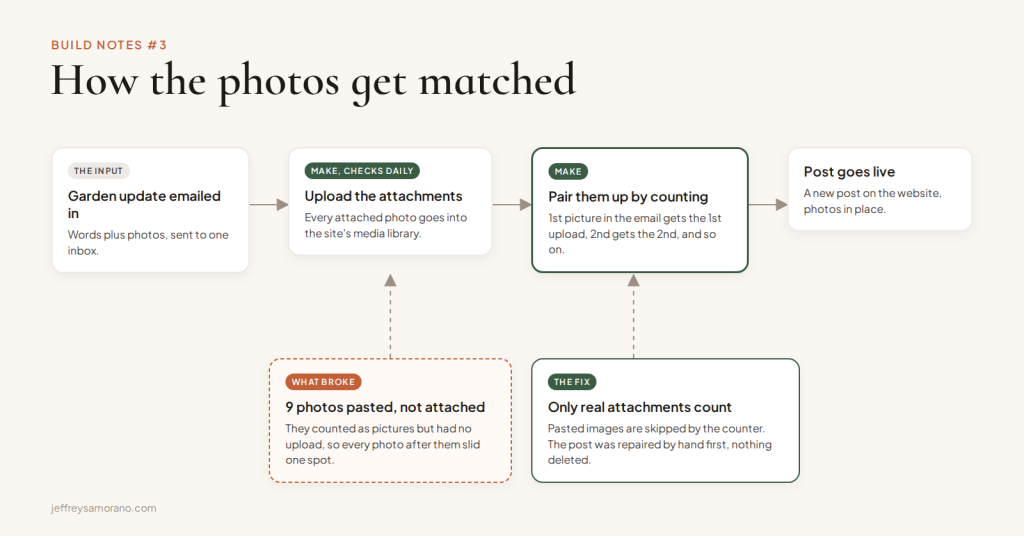
The automation matches photos by counting. The first picture in the email gets the first uploaded file, the second gets the second, and so on down the post.
That works as long as every picture in the email is an attachment. This time, 9 of the photos had been pasted straight in from a nature-photo website (iNaturalist) instead of attached. To the automation they looked like pictures in the email, but there was no uploaded file behind them. So the count slid. One butterfly got the wrong photo, and the last 8 spots pointed at files the post couldn’t find.
Nobody did anything wrong here. Pasting a photo from a website is a normal thing to do. The automation just had a rule nobody had ever written down: attach, don’t paste.
What I fixed
The post first, then the automation.
- Repaired the post instead of deleting it. Pointed the 8 empty spots back at the photos that had uploaded fine all along, and gave the butterfly its own picture back.
- Brought the pasted photos home. The 9 pasted photos were still loading from the other website. I copied each one into the site’s own media library and swapped it in, so nothing on the page depends on someone else’s server.
- Cleaned up the duplicate. The reposted bottom half was now an exact copy, so it went to the trash, where it can still be recovered.
- Changed how the automation counts. It now counts only pictures that are real attachments. A pasted image gets skipped instead of throwing off everything after it.
- Fixed a quieter bug while I was in there. The step that swaps each photo into the post was searching for the whole image tag, character for character. Any tag with a bracket, a plus sign or a question mark in it could never match. Now it searches by the image address alone.
The parts that took the real time
Ruling out the obvious answer
“The photos were too big” is the first thing anyone guesses, and it’s often right. Here it wasn’t, and the only way to know was to check every upload. Eighteen files, all fine. That check is what kept everyone from chasing the wrong problem.
Working without the label
Email photos carry a small ID that says “this attachment goes in this spot.” Matching on that would have been the clean fix. The tool that reads the email doesn’t pass that ID along, so the automation can’t use it. Counting only real attachments is the next best thing.
Being honest about what’s left
The new version rests on one assumption: the attachments arrive in the same order the pictures appear in the email. That held for this email. I haven’t proven it holds for every email. And if someone attaches something that isn’t a photo, like a PDF, it would still shift the count. Both are written down in the build notes, so the next person (probably me) doesn’t have to rediscover them. The updated automation is in place. Its first real post is the real test.
A different kind of broken image
A few days earlier I had checked all 816 posts on the site. Six older posts, from before the automation existed, had 15 photos linked from a private Google Group. Those links look fine to anyone signed into the group and broken to everyone else. So the people most likely to check the site were the people who would never see the problem. None of the automation’s own posts had it.
The part I’m proudest of
Nothing got deleted.
Deleting and reposting would have made the problem disappear. It also would have left the cause in place, ready to break the next post the same way, with nobody knowing why. Asking “are the photos actually gone?” before touching anything turned a cleanup job into a repair, and a fix at the source.
That’s the kind of work I like best. Not the most code. The fewest moves that make the whole thing right.
If something you built starts acting broken
Before you delete anything, check two things.
- Is it actually gone? Files, contacts, orders. Very often it’s still there, just not connected to the place you’re looking.
- What was different this time? An automation that worked for months and then broke once usually met an input it had never seen. Here, it was a pasted photo.
Find that one difference and you usually find the fix. You also keep everything you were about to throw away.
If your setup has a few things that work most of the time and nobody quite trusts, the Digital Clarity Quiz takes about three minutes and shows you where to look first.